
Infectious Smile Private Server Commands: Full Admin List and Usage
Infectious Smile private server commands allow server owners to manage lobby access, adjust round timers, spawn items, modify character stats, and trigger map events directly through the in-game chat bar using prefix commands like regen, give, and lockserver.
Infectious Smile private server commands allow server owners to manage lobby access, adjust round timers, spawn items, modify character stats, and trigger map events directly through the in-game chat bar using prefix commands like regen, give, and lockserver.
Private servers in the Roblox horror survival title give VIP host access to dozens of chat instructions. While progress such as Smile Coins earned while testing in a private server does not transfer over to public servers, these administrative controls let hosts manipulate infection status, test map hazards, and practice mechanics without interference.
How to Enter Private Server Commands
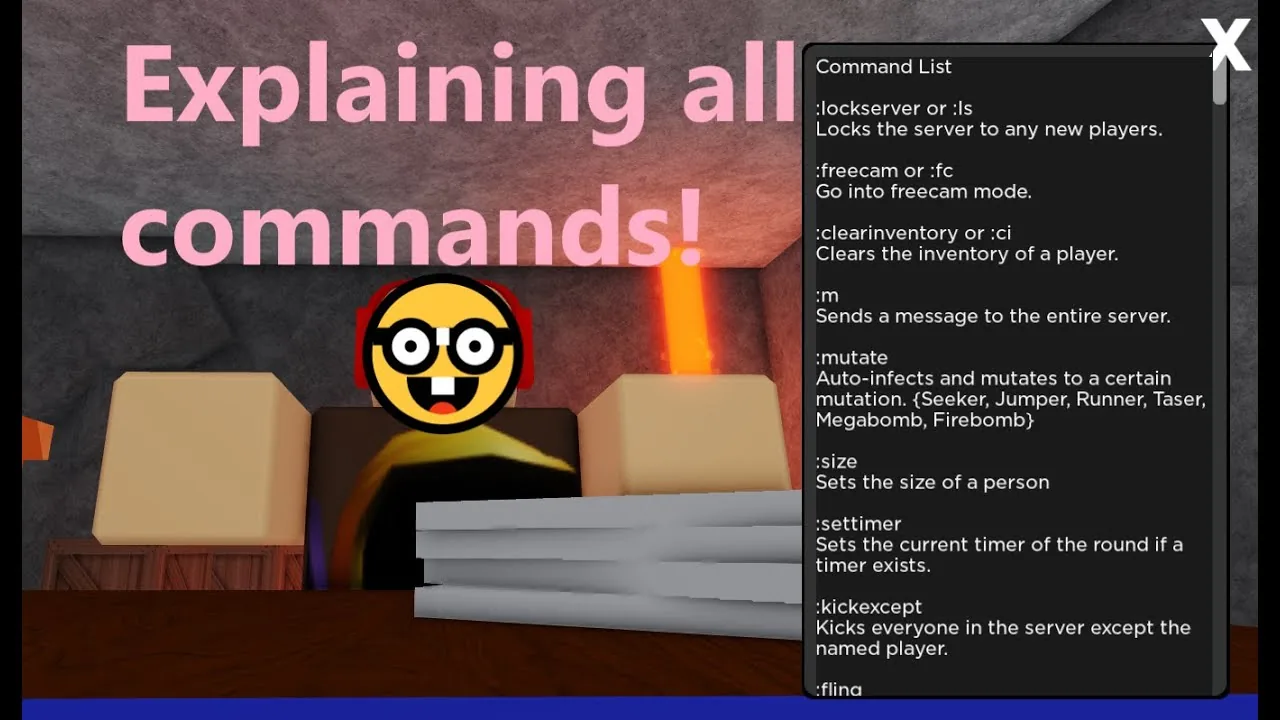
Host commands are entered straight into the standard Roblox chat window. Most instructions require a colon prefix followed by the primary command name or its shorthand alias. Typing :cmds in chat opens the in-game reference sidebar that displays registered administrative options.
When targeting another user, add their username or character identifier after the command name. For example, typing :give followed by the target name and the item name places that object directly into their backpack. For certain potions, the text parser recognizes specific internal labels rather than their full shop names, requiring potion for the ice potion and invisibility for the invisibility brew.
| Command Category | Best Used For | Operational Limitation |
|---|---|---|
| Lobby Access (:lockserver, :unlockserver) | Restricting entry during tests or solo setups | Prevents friends or outside players from joining until unlocked |
| Item Spawning (:give, :clearinventory) | Testing specific weapon interactions or earning gear badges | Coins and weapon items obtained do not carry over to public matches |
| Round Control (:regen, :settimer, :clearmaps) | Resetting broken rounds or accelerating mountain collapse | Instantly removes stage stages and clears active map progress |
Server Access and Moderation Commands
Server owners have access to session control tools to filter incoming traffic and moderate who remains active in the session:
- :lockserver or :ls: Closes the server so no additional players can join.
- :unlockserver or :ul: Reopens the server so friends and invited players can enter.
- :kickexcept [player]: Disconnects every user on the server except the designated name.
- :rejoin or :rj: Forces your client to leave the private session and connect to a public server.
- :resetgame: Restarts the match loop whenever stage transitions or round rotations stall.
- :shutdown: Closes the active instance, sending a disconnect notification to all occupants.
- :notif: Sends a customized pop-up notification window to players that remains until dismissed.
- :memcheck: Displays current server memory usage data in the text log.
- :poll: Launches a server-wide voting prompt with custom title and time flags.
Player State and Infection Modifiers
These instructions alter participant health, movement values, and team alignment across humans and smiles:
- :infect or :inf: Converts any target human into a smiling, bypassing safe zone protections.
- :humanize or :hu: Reverts an infected smiling back into a human survivor.
- :mutate: Triggers an automatic infection and assigns a mutation type such as Seeker or Runner.
- :endanger and :unendanger: Sets a smiling character to endangered status with 200 health, preventing human knife stabs from freeing victims.
- :god or :ff: Wraps the target in a force field, granting immunity to incoming damage.
- :unff: Strips the protective force field away.
- :kill: Instantly eliminates the targeted participant without a standard defeat delay.
- :loopkill and :unloopkill: Repeatedly downs a selected character upon spawning until toggled off.
- :ragdoll and :thaw: Forces a character to collapse onto the floor, preventing item usage until thawed or reset.
- :freeze: Roots a character in place, stopping all ground movement.
- :respawn: Forces an immediate character reset without triggering a death screen animation.
- :speed [number]: Sets walk speed, with the default human value calibrated at 16.
- :jumppower [number]: Adjusts vertical jump height, with 50 serving as standard output.
- :hp [number] and :maxhp [number]: Rewrites current or maximum health, where 100 represents full baseline vitality.
Equipment and Spawning Commands
Hosts can supply participants with various weapons and testing tools to inspect interactions:
- :give or :g [player] [item]: Adds tools to an inventory, including shotguns, blades, or the hidden sniper rifle.
- :clearinventory or :ci [player]: Wipes every item currently stored inside the chosen backpack.
- :btools: Grants Building Tools (F3X) to construct or delete physical geometry across the active area.
- :tooledit: Modifies basic weapon properties, enabling manual adjustments to swing cooldowns and damage values.
- :spawn or :sp: Generates target non-player characters or interactive props directly into the map space.
Using these item commands allows hosts to equip necessary combinations on an alternate account to satisfy requirements for the all weapons badge in a controlled setting without waiting for random map rotations.
Environment, Round, and Camera Controls
Visual settings, round clocks, and camera perspectives can be adjusted to match custom testing scenarios:
- :settimer [seconds]: Overrides the mountain collapse countdown, where 300 seconds represents the standard five-minute timer.
- :regen and :disaster: Triggers stage rebuilding and environmental hazard cycles outlined on the game page.
- :clearmaps: Deletes all four spawned stage platforms simultaneously.
- :unanchormap: Unwelds the active stages, sending the physical map geometry plummeting into the void.
- :clocktime [0-24]: Adjusts sky lighting across the map, ranging from midnight to midday illumination.
- :setday [number]: Sets the active day counter inside the build and survive game mode.
- :setterrain [type]: Modifies surface textures across designated regions to Grass, Ice, Snow, or Sand.
- :freecam or :fc: Detaches your view from your character model, allowing collision-free flight through walls.
- :unfreecam or :unfc: Restores camera placement back to your avatar.
- :view [player] and :unview: Spectates another participant's screen directly before snapping back to default view.
- :playmusic [asset ID]: Broadcasts background audio across the entire server using valid Roblox audio IDs.
Avatar and Fun Commands
Hosts can modify character appearances, scales, and physics behaviors for community events:
- :size [multiplier]: Scales character dimensions up or down, where 1 is standard scale, 2 doubles character size, and 0.5 halves scale.
- :char [User ID]: Replaces the target avatar appearance with the catalog assets of any valid Roblox user ID.
- :disguise and :undisguise: Transforms the model into one of roughly 50 pre-selected avatar styles, then restores standard appearance.
- :invis and :vis: Toggles character invisibility without showing typical potion aura particles.
- :fling: Propels a selected player into the air in a random direction.
- :ignite: Sets the target ablaze, creating flames that can ignite nearby wooden structures.
- :explode: Causes the selected character to detonate, dealing fatal blast damage to nearby players.
- :clone: Creates an automated duplicate of your avatar that attacks smilings and infected opponents.
- :smite: Calls down lightning on a target, dealing damage to both player models and placed blocks.
Certain moderation commands including standard ban and admin delegation toggles exhibit broken script execution inside specific updates. Testing basic commands like :ls, :give, and :settimer first verifies which host controls operate correctly in your current server version. Players holding server ownership or the VIP pass can use these chat tools to explore hidden mechanics and inspect map layouts under zero survival pressure.
Related Guides
Badges
Review the complete roster of official Infectious Smile badges, their recorded catalog descriptions, and the exact requirements to earn each achievement.
Gamepasses
Review official Infectious Smile gamepass costs and listed perks to pick the knife spawns, map voting, or visual upgrades you want.